In today’s digital landscape, most businesses rush to run ads on Facebook, Google or even Bing — while largely overlooking one of the most powerful, cost-effective advertising platforms available: Pinterest.
For brands, especially small businesses whose offerings naturally align with the kinds of inspiration people look for on Pinterest, this oversight is a huge missed opportunity.
Pinterest is more than just a platform for saving recipes or dream home decor. It’s a visual search engine with built-in social sharing power, and it has quietly become one of the highest-intent platforms on the internet — making it a phenomenal place to advertise.
Let’s explore exactly how Pinterest advertising works, what makes it so different from traditional advertising, and why smart brands are turning to Pinterest to drive results.
How does Pinterest advertising work?
Pinterest ads — called Promoted Pins — are native ads that blend seamlessly into the Pinterest feed. They look just like regular Pins, except that you pay to boost their reach to your ideal audience.
Here’s a simple example:
✅ Say you want to grow your email list. ✅ You design an eye-catching Pin with a compelling offer — perhaps a free guide or checklist tied to a major pain point your audience has. ✅ You post it to Pinterest, linking to a landing page on your site where visitors can download the gift in exchange for their email address.
If your Pin proves popular, Pinterest’s organic algorithm will start showing it more. But you can also pay to promote it, so Pinterest actively pushes it out to a much larger, carefully chosen audience — based on their interests, demographics, locations, languages, and even the keywords they’re searching for.
It’s like running a hyper-targeted ad campaign across both a search engine and a social platform, all in one place.
Why Pinterest advertising is uniquely powerful — and how it beats other platforms
While Facebook and Google are crowded, expensive, and increasingly restrictive, Pinterest offers distinct advantages that make it a dream for many businesses:
1. It’s far less saturated — meaning lower costs and higher ROI
Pinterest is still massively underused by advertisers. This relative lack of competition means:
✅ Cost per clicks (CPCs) are generally much cheaper than on Facebook or Google Ads. ✅ Your ad dollars stretch further, letting you build bigger audiences and drive more traffic for the same spend.
For small businesses or emerging brands, this is a huge win — you can affordably get your offers in front of more people.
2. Compound results that keep paying off — even after you stop paying
Here’s where Pinterest is truly unlike any other ad platform.
When you promote a Pin on Pinterest:
✅ People who see and love it may save it to their own boards, essentially bookmarking it for later. ✅ These saves boost the organic reach of your Pin, since Pinterest’s algorithm sees the engagement and decides to show it to even more people. ✅ This means that long after your paid campaign ends, your Pins can keep driving traffic and sales for months or even years, as they continue to be saved, discovered, and reshared.
No other platform gives you this level of residual value. With Facebook or Google Ads, the second you stop paying, your ads disappear and your traffic stops. On Pinterest, promoted content can evolve into long-lasting organic assets.
3. Pinterest users have unmatched buying intent
While people often scroll Facebook or Instagram simply to pass time, Pinterest users are actively planning purchases. They use Pinterest to discover products, get inspiration, and save ideas for things they fully intend to buy.
In fact:
✅ Pinterest users are 2.5x more likely to say they’re always shopping compared to people on other platforms. ✅ 97% of top searches on Pinterest are unbranded, meaning users are open to discovering new businesses (like yours). ✅ It beats Facebook, Google, and YouTube in terms of the percentage of users on the platform specifically looking to shop.
This means your ads are reaching people at the exact moment they’re planning — and ready — to buy.
4. Powerful hybrid targeting: the best of both worlds
Pinterest is uniquely positioned as both a social network and a search engine. That means you can target:
✅ Keywords, just like you would with Google Ads, reaching people actively searching for products or ideas tied to your business. ✅ Interests, demographics, locations, and more, just like you would with Facebook Ads.
This hybrid approach gives you sharper, layered targeting, letting you zero in on the exact audience most likely to buy from you.
So, who should be advertising on Pinterest?
Pinterest advertising is an incredible fit for any brand whose products or content line up with the platform’s strongest categories, including:
🏠 Home and décor 🍰 Food and drink ✈️ Travel 💄 Beauty and hair 🎨 DIY and crafts 💪 Health and fitness 💍 Weddings and events 🛍 Fashion and style
If your business is connected to these areas — or if your customers are on Pinterest seeking inspiration tied to what you sell — you’re perfectly positioned to win big.
Why consistency matters here too
Just like with organic Pinterest growth, Pinterest Ads work best when supported by a steady stream of fresh content. The more high-quality Pins you have, the more chances you give Pinterest to find your audience and keep feeding them relevant ads that lead to sales.
The bottom line: Pinterest Ads are an untapped goldmine for smart brands
For brands and small businesses, Pinterest advertising offers:
✨ Lower ad costs than saturated platforms like Facebook and Google ✨ A high-intent audience actively planning purchases ✨ Compound results that keep driving traffic long after you stop paying ✨ Incredible hybrid targeting options for keywords + interests
It’s no exaggeration to say that Pinterest is one of the most underrated, cost-effective advertising platforms out there — and getting in now while competition is still low could give your brand a huge edge.
When it comes to growing your brand on Pinterest, there’s one truth that stands above all others: content is everything.
Pinterest isn’t just a social network; it’s a massive visual search engine and discovery platform, where over 570 million people go each month to find new ideas, get inspired, and plan purchases. If you want your brand to be part of that journey — if you want Pinterest to actually show your products, your guides, your brand story — it all comes down to one thing:
This isn’t just a best practice — it’s the very core of how Pinterest works today. Let’s break down why this matters so much, what’s changed on Pinterest, and how your brand can build a strategy that ensures you’re always showing up in front of the right people.
Why fresh content matters more than ever on Pinterest
🔥 Pinterest is driven by content discovery
Pinterest exists to give users new ideas, new products, new solutions. People come to Pinterest to explore — not just to scroll through the same posts over and over. That means Pinterest’s entire mission is to serve up fresh, engaging content that keeps users inspired and coming back for more.
🚀 Fresh content is now Pinterest’s #1 ranking factor
Pinterest has been clear: their algorithm now prioritizes fresh content above all else. Not long ago, Pinterest mostly rewarded Pins that racked up the most saves and repins, which meant popular content could show up again and again in people’s feeds. Often, users would see the same handful of Pins for weeks.
But Pinterest realized this wasn’t a great experience. Users wanted to discover new ideas and products, not see the same Pins recycled endlessly. That’s why Pinterest shifted its algorithm to prioritize fresh, original content, followed by consistent posting.
In Pinterest’s own words:
“Fresh content is the most important thing you can do to get distribution on Pinterest. Consistency is the next most important.”
This is incredibly good news for brands — especially newer or smaller ones. It means you don’t need a huge following or viral Pin history to get seen. If you create quality content that’s new to the platform, Pinterest will actively push it to people looking for what you offer.
The power of fresh content: more reach, more engagement, more sales
Here’s what happens when your brand consistently publishes fresh content on Pinterest:
✅ You show up in more home feeds. Pinterest wants to keep users inspired, so it gives preference to new Pins. ✅ You appear in more searches. Each new Pin gives you another chance to rank for the keywords your audience is typing in. ✅ You keep followers engaged. Instead of seeing the same old content, your audience gets a steady stream of new ideas from your brand, building loyalty and trust. ✅ You drive more traffic and sales. More fresh content = more entry points to your website and product pages.
Why a content strategy is essential on Pinterest
Because Pinterest rewards fresh content and consistency, your success on the platform isn’t just about having a few great Pins — it’s about having a system for regularly creating and sharing new, high-quality visuals.
That means you need a Pinterest content strategy, not random bursts of posting.
A strong Pinterest strategy will:
Identify what types of content your audience loves (product showcases, how-to guides, inspiration boards, user-generated content, etc.)
Plan a mix of formats (static Pins, idea Pins, video Pins) to keep your profile dynamic
Schedule out regular posting so you’re always adding fresh content, keeping Pinterest’s algorithm happy and your brand top of mind
How to be consistent: the power of a content calendar
Want to know the simplest way to master consistency on Pinterest? 👉 Use a content calendar.
A content calendar helps you:
✅ Map out your fresh Pins weeks or months in advance ✅ Ensure you’re posting regularly — ideally daily or multiple times per week ✅ Plan around seasonal trends or product launches (for example, starting to post holiday content 2-3 months before the season) ✅ Avoid the stress of scrambling for last-minute ideas
You can build your Pinterest content calendar in tools like Trello, Asana, or even a simple spreadsheet. The key is to outline:
What you’ll post: Is it a new product shot? A blog graphic? A user testimonial? A seasonal tip?
When you’ll post it: Scheduling keeps you consistent, even during busy periods.
How you’ll optimize it: What keywords will you use in the title and description? What boards will you save it to?
The bottom line: fresh content + consistency = Pinterest success
If there’s one golden rule for Pinterest today, it’s this:
👉 Fresh, high-quality content posted consistently is the #1 way to grow.
Pinterest is explicitly telling brands what they want:
More new ideas.
More regular posting.
More value for their users.
Brands that deliver this get rewarded with higher reach, more visibility, and more chances to convert casual browsers into loyal customers.
Ready to level up your Pinterest presence?
Start building your fresh content engine today:
✅ Brainstorm new, original Pin ideas your audience will love. ✅ Set up a simple content calendar so you’re consistently posting. ✅ Keep optimizing with strong keywords so your fresh Pins get found.
Because when you combine fresh content with consistency, Pinterest won’t just be another social channel — it’ll become one of your most powerful sales and traffic drivers.
If you run an ecommerce brand and you’re not using Pinterest, you’re overlooking one of the most potent growth engines available today. In a digital landscape crowded with fleeting posts and rising ad costs, Pinterest stands out as a marketing channel that can consistently drive high-intent traffic, build brand loyalty, and skyrocket your sales — all with a fraction of the effort (and budget) you might spend elsewhere.
Here’s why smart ecommerce brands are doubling down on Pinterest — and why you should too.
Pinterest is both a visual search engine and a social platform — a rare combo that’s perfect for ecommerce
Most platforms are either social (like Instagram or TikTok) or search (like Google). Pinterest is uniquely both.
As a social platform, your pins can go viral — being saved, shared, and re-pinned by thousands. A single compelling product pin can spread organically for months or even years, continually putting your brand in front of new shoppers.
As a visual search engine, Pinterest acts like Google for products. Shoppers actively search for “summer dresses,” “modern kitchen ideas,” “home office essentials,” or “gifts for new moms” — meaning they’re discovering products with real purchase intent. By optimizing your pins with strategic keywords, your products show up exactly when customers are looking for them.
This dual power means your Pinterest content does the heavy lifting for you — attracting, nurturing, and converting buyers on autopilot.
You don’t need followers to drive sales on Pinterest
Unlike Instagram or TikTok, where reach is largely tied to your follower count and tricky algorithms, Pinterest is a level playing field.
Even with zero followers, your pins can rank in Pinterest’s search results and show up in smart feeds, driving qualified traffic straight to your product pages. For ecommerce brands — especially newer ones without huge audiences — this is a massive advantage.
Pinterest shoppers are planners with money to spend
Pinterest users aren’t just scrolling to kill time. They’re actively planning future purchases — from wardrobe overhauls to home makeovers.
93% of Pinterest users use the platform to plan purchases.
50% consider Pinterest a shopping destination.
Pinterest shoppers spend 80% more each month than shoppers on other platforms — and 1 in 3 has an annual income over $100,000.
This is a dream audience for ecommerce brands: users with disposable income, actively browsing for what to buy next.
Pinterest’s massive, high-value audience is ripe for ecommerce
Pinterest now has 570 million monthly active users globally, with 96 million in the U.S. alone.
Gen Z makes up 42% of Pinterest’s active users, making it a strategic channel if you want to capture this trend-driven, highly engaged demographic.
Women still represent 76% of Pinterest’s audience, a huge plus for ecommerce brands in fashion, beauty, wellness, home décor, and lifestyle.
These shoppers come to Pinterest with intent, not idle curiosity — making it one of the highest-ROI channels for driving ecommerce sales.
Pinterest traffic compounds over time — unlike any other social platform
A post on Instagram or TikTok typically fades in 24-48 hours. But on Pinterest, a well-optimized product pin can keep driving traffic for months or even years, showing up again and again in search results and user feeds.
This means your effort on Pinterest doesn’t disappear after a few days — it builds on itself, growing your brand visibility, traffic, and sales over time.
Pinterest is perfect for ecommerce lead generation & retargeting
Because Pinterest is so intent-driven, it’s also ideal for building your email list and retargeting visitors.
You can create pins that link directly to landing pages offering discounts, style guides, or downloadable lookbooks — capturing leads you can nurture via email.
Pinterest’s own ads platform lets you easily retarget users who’ve engaged with your pins or visited your site, giving you more chances to convert them.
This makes Pinterest not just a traffic driver, but a full-funnel marketing powerhouse. The bottom line: Pinterest is a must-have for ecommerce brands
Pinterest isn’t just another social channel — it’s a visual search engine full of ready-to-shop customers, with a social sharing engine that makes your products discoverable again and again.
If you’re serious about growing your ecommerce brand, Pinterest offers:
✅ Evergreen product exposure ✅ An audience with strong buying intent ✅ Higher average spending than other platforms ✅ Compounding returns on your content investment
🚀 Action step
If Pinterest isn’t already part of your ecommerce marketing mix, it’s time to fix that. Start by setting up a business account, optimize your boards and pins with the right keywords, and showcase your products in lifestyle-focused, inspirational imagery that drives clicks to your store.
Your future customers are already on Pinterest — make sure your brand is there to meet them.
When most people think of Pinterest, they picture a fun place to scroll through recipes, style inspiration, or home décor ideas. But for savvy marketers and business owners, Pinterest is so much more: it’s one of the most powerful visual search engines in the world.
And just like Google, Pinterest runs on keywords. That means if you’re not doing serious keyword research, you’re almost guaranteed to stay invisible — no matter how beautiful your pins are.
Let’s break down why keyword research is absolutely essential if you want to be successful on Pinterest, and how it can completely transform your results. Pinterest isn’t just social media — it’s a search engine
Here’s what sets Pinterest apart: Yes, it has social features — users save, share, and follow. But at its core, Pinterest is a discovery platform powered by search.
Over 570 million people use Pinterest every month, typing millions of searches into that little white bar at the top:
“Minimalist home office ideas”
“Easy vegan dinner recipes”
“Summer wedding guest dresses”
“Small business packaging inspiration”
Each of those searches is an opportunity for your content to appear. But Pinterest won’t magically know what your pins are about. It relies on the keywords you use to decide where your content should show up. Why keyword research matters on Pinterest 🎯 It tells you exactly what your audience is searching for
Maybe you sell boho jewelry. But are Pinterest users actually typing in “boho jewelry”? Or are they searching for “festival accessories,” “layered necklaces,” or “handmade silver rings”?
Keyword research uncovers the exact words your target audience uses, so you can mirror that language in all aspects of your Pinterest strategy. This dramatically increases your chances of being found by people actively looking for what you offer. 🔍 It helps you optimise every inch of your Pinterest account
Because Pinterest is a search engine, it’s not just your pins that matter. You want to optimise all parts of your Pinterest presence with strategic keywords, including: ✅ Your username ✅ Your profile bio ✅ Board titles and descriptions ✅ Pin titles and descriptions ✅ Even the text overlay on your pin images
When you use the right keywords in these places, Pinterest knows exactly who to show your content to — and your visibility skyrockets. ⏳ It saves you time by showing you which keywords are actually popular
One of the most overlooked benefits of keyword research? It prevents you from wasting time. You might think your niche term is popular, but keyword research could reveal that no one’s searching for it on Pinterest.
Instead, you might discover closely related, higher-traffic keywords you can target. That way, you’re always optimising for terms people are actually searching for, which means more impressions, more clicks, and ultimately more conversions. How keyword research supercharges your Pinterest strategy
Here’s what happens when you take the time to do proper keyword research:
✅ More reach: You show up in Pinterest search results for the exact terms your audience is typing in. ✅ Better engagement: Your pins feel instantly relevant to what people want, so they get saved and shared more. ✅ Higher website traffic: With optimised pins, you’ll drive qualified visitors straight to your site, landing pages, or online store. ✅ Compounding results: Because pins last forever on Pinterest, your keyword-optimised content keeps working for you month after month, driving consistent, long-term traffic. The bottom line: Without keyword research, you’re guessing — and likely staying invisible
Pinterest is too powerful a platform to leave to guesswork. Think of keyword research like your personal Pinterest roadmap. It shows you:
🚀 What your audience is already looking for 🚀 The language they use (so you can literally “speak their search”) 🚀 Which keywords will give your pins the best chance to rank and get discovered
When you know this, you can strategically infuse those keywords into every part of your Pinterest account — from your profile to every pin title and description. This is how you move from shouting into the void to consistently showing up where your dream customers are already searching. 🔥 Ready to start?
If you haven’t done Pinterest keyword research yet, it’s time. Use Pinterest’s own search bar suggestions, check out what keywords competitors are using, or dive into tools like Pinterest Trends. Then start optimising your boards, pins, and profile with the right keywords.
Because on Pinterest, success doesn’t go to the prettiest pins — it goes to the most strategic.
If you’re an ecommerce brand owner who’s only ever thought of Pinterest as a place for recipes, outfit ideas or DIY crafts, it’s time to think again. Pinterest isn’t just a mood board — it’s one of the most effective sales and traffic channels available to ecommerce brands today.
And at the heart of Pinterest’s ecommerce power lies one of its smartest tools: rich pins. Whether you want to drive more shoppers to your store, boost brand visibility, or increase conversions, rich pins are a must-have in your Pinterest marketing arsenal.
Here’s everything you need to know. What are rich pins — and why should ecommerce brands care?
Think of rich pins as supercharged Pinterest pins. While a standard pin is simply an image with a short caption, rich pins automatically pull metadata from your website and display it right on the pin. This makes your pins more informative, more engaging, and ultimately more actionable for shoppers.
Rich pins update automatically whenever you change details on your website. That means if you change a product price, add a new feature, or update availability, your rich pins on Pinterest reflect those changes instantly.
In short: rich pins turn Pinterest from a simple inspiration platform into a direct extension of your ecommerce store. The 3 types of rich pins and why they matter
Pinterest offers three types of rich pins, each designed to serve different goals. Here’s how they break down: 📰 1. Article rich pins
Perfect if your ecommerce brand runs a blog or publishes valuable content. Article rich pins:
✅ Display the title of your article, your brand name, and a description pulled straight from your site. ✅ Always show your website link, driving readers directly to your content. ✅ Feature your profile prominently, making it easy for users to follow you and become part of your loyal audience.
Why does this matter? It helps establish your brand as an authority. You’re not just selling products; you’re sharing expertise, which builds trust. Whether it’s style guides, how-to content, or tips tied to your products, article rich pins make your content easier to discover and more likely to convert casual browsers into followers and customers. 🍲 2. Recipe rich pins
While more niche, if your ecommerce brand has anything to do with food (think: cookware, specialty ingredients, meal kits), recipe rich pins are a goldmine.
✅ They showcase ingredients, cooking times, and serving sizes right on the pin. ✅ This detailed format makes users far more likely to save and try your recipes — and check out your products while they’re at it.
For ecommerce brands, this builds repeated exposure and positions your product as the essential tool or ingredient behind every saved recipe. 🛒 3. Product rich pins — the ultimate tool for ecommerce
This is where things get truly exciting for ecommerce brands.
Product rich pins are designed to drive direct sales. They automatically pull in crucial shopping details from your product pages, such as:
✅ Price (including original + sale price if discounted). ✅ Availability (in stock or out of stock). ✅ Brand name, product title, and description. ✅ Shipping highlights, like “Free shipping.” ✅ Star ratings and reviews.
Plus, shoppers can scroll through multiple images right inside Pinterest, getting a multi-angle view just as they would on your own site.
The experience feels almost identical to being on your online store — complete with a bold button that takes them directly to your product page to complete their purchase. The powerful benefits of using rich pins for ecommerce brands
Here’s why rich pins can become one of your most valuable ecommerce marketing tools on Pinterest: 🚀 1. Increased visibility & trust
Rich pins stand out visually on Pinterest because they display so much more information. The extra details signal to users that you’re a legitimate brand — not just a random Pinner.
The automatically synced data (like price and availability) also means shoppers always see accurate, up-to-date info, boosting confidence and reducing hesitation. 💰 2. Drive more qualified traffic that’s ready to buy
Rich pins cut down on steps. Instead of a user having to click through to learn details, they see key info instantly, which filters out casual browsers and brings only truly interested shoppers to your site.
When they do click, they’re already informed — and far more likely to convert. 🔄 3. Save time and stay up to date automatically
Because rich pins pull data directly from your product pages, you don’t have to manually update your pins if something changes. Your Pinterest content stays current without the extra work — ensuring shoppers never see outdated prices or out-of-stock items. ❤️ 4. Build stronger brand connections
With article rich pins, you’re giving Pinterest users easy ways to engage beyond the product page — whether that’s by reading your style tips, discovering how-tos, or following your profile. This turns one-time visitors into followers and brand fans. How rich pins fit into your broader Pinterest ecommerce strategy
Pinterest is where people come to plan and shop. 93% of users use Pinterest to plan purchases, and 50% view it as a shopping destination. That means every pin you create is an opportunity to showcase your products at the exact moment shoppers are looking for them.
Rich pins simply make your entire Pinterest presence more powerful:
✅ Your product pins drive sales with up-to-date pricing, availability, and direct links to buy. ✅ Your article pins build authority and send traffic to your blog content. ✅ If relevant, your recipe pins tie your products to experiences people want to recreate.
Together, they turn Pinterest from a passive inspiration board into an active sales funnel that works 24/7 to drive brand discovery, engagement, and purchases. The bottom line: Rich pins are non-negotiable for ecommerce success on Pinterest
If you’re an ecommerce brand, enabling rich pins isn’t just a nice extra — it’s essential. They make your Pinterest account an extension of your online store, seamlessly pulling shoppers from discovery to purchase.
So don’t leave Pinterest traffic (or sales) on the table. Set up rich pins, optimise your content, and watch Pinterest become one of your highest-performing marketing channels.
If you run an e-commerce brand and you’re looking for a game-changing way to get your products discovered, Pinterest’s Retail Catalogs feature might just be the most powerful tool you’ve never heard of.
In a digital world where cutting through the noise is hard and ad costs keep rising, Pinterest’s Retail Catalogs give brands — even small, relatively unknown ones — a direct pipeline to millions of shoppers actively looking for inspiration and ready to buy.
Let’s explore what this incredible feature is, what you need to get started, and why it’s a must-have if you want to massively boost your brand’s visibility on Pinterest. What exactly is Pinterest’s Retail Catalogs feature?
Pinterest Retail Catalogs allow e-commerce brands to upload their entire product catalog directly to Pinterest. Once connected, Pinterest automatically turns every product in your catalog into a shoppable Pin, complete with real-time product data like price, availability, and descriptions.
Imagine this: ✅ Every item in your store — your dresses, your skincare kits, your artisan coffee blends — becomes a dynamic, clickable Pin that can show up across Pinterest’s massive discovery ecosystem.
No manual pinning required. No separate uploads. Pinterest takes care of it, creating a living, breathing showcase of your entire shop. What you need to set it up
Pinterest’s Retail Catalogs is designed for legitimate e-commerce businesses, so there are a few requirements you’ll need to meet first:
Pinterest Business account — to unlock analytics, ads, and catalogs.
Claimed website — Pinterest needs to verify your site to ensure authenticity.
Product catalog must come from your claimed site — this ensures you’re only promoting items from your verified store.
Your site must meet Pinterest’s merchant guidelines, which check for things like secure checkout, clear return policies, and quality images.
Once these are in place, you can connect your product feed, and Pinterest handles the heavy lifting. The mind-blowing impact this can have on brand visibility
Here’s why Retail Catalogs are a total game changer, especially for brands that are still building awareness:
Pinterest is not just a social media platform — it’s a visual search engine where people actively plan purchases.
Over 570 million people use Pinterest each month to dream, plan, and shop.
93% of active Pinners use Pinterest to plan purchases, and 50% see it as a shopping destination.
When you upload your catalog, your products immediately become discoverable in these users’ searches, home feeds, and shopping experiences. That means your little-known brand can suddenly appear right alongside major competitors. Even more powerful if you’re in one of Pinterest’s top categories
Pinterest’s strongest verticals are tailor-made for consumer products, including:
If your products fit into these categories, Pinterest is already primed with millions of users actively searching and shopping for items just like yours. By connecting your catalog, your brand gets instant access to this demand. The automatic creation of buyable Pins is a game changer
Here’s the most powerful part: When your catalog is linked, Pinterest automatically generates shoppable Product Pins for every item. These Pins include:
✅ Price (and if you run sales, they automatically show original vs sale pricing) ✅ Stock availability ✅ Product title, brand, and description ✅ Direct links that take shoppers right to your product page to buy ✅ Multiple product images if available on your site
It’s like dropping your entire store onto Pinterest, with no extra manual work — and each Pin is a 24/7 digital salesperson leading buyers straight to checkout. Why this is gold for lesser-known brands
Most small e-commerce brands struggle with one thing: visibility. Without a huge ad budget, you’re competing against giants who already dominate social feeds and Google Shopping.
But with Pinterest Retail Catalogs, you’re plugging directly into a platform where:
Shoppers are discovery-driven, meaning they’re actively looking for new brands and products.
Pinterest doesn’t favor only big brands — its smart feed and search prioritize relevance and quality imagery, giving smaller brands an equal shot at attention.
Your catalog products can show up for thousands of different keyword searches, giving you massive organic reach without constantly posting new content.
The bottom line: Pinterest Retail Catalogs is one of the smartest growth hacks for e-commerce today
If you want to dramatically boost your brand’s visibility, appear in front of high-intent shoppers, and convert inspiration into sales, connecting your product catalog to Pinterest is non-negotiable.
It automatically turns your store into a dynamic Pinterest showcase, gets your products in front of shoppers at the exact moment they’re planning their next purchase, and helps you compete toe-to-toe with much bigger players — all without blowing your marketing budget. 🚀 Ready to start?
Make sure your site meets Pinterest’s merchant guidelines, set up your Business account, claim your website, and upload your product feed. Then watch as Pinterest goes to work, automatically creating hundreds — or thousands — of beautiful, shoppable Pins that work around the clock to grow your brand.
Because the truth is, your customers are already on Pinterest looking for products like yours. It’s time to make sure they can find you.
User-generated content (UGC) is any form of content—photos, videos, reviews, testimonials, social media posts, or blog articles—created by your customers rather than your brand. It’s authentic, organic proof of your product in action, shared voluntarily by real people.
User-generated content is one of the most powerful ways to build credibility and increase sales. When your customers share photos, videos, or reviews of your product, it acts as authentic social proof that your brand delivers real value. Research shows that 79% of people say UGC highly impacts their purchasing decisions, while content created by customers is considered 2.4 times more authentic than branded content.
Potential buyers trust the voices of other customers far more than traditional advertising, so showcasing UGC on your website and social media channels can significantly boost conversions. In fact, brands that feature UGC see, on average, a 20–30% increase in engagement and conversions.
When people see others proudly using and recommending your products, it signals popularity, reliability, and trustworthiness—all of which directly influence buying decisions. By integrating UGC into your marketing strategy, you’re not just highlighting happy customers, you’re creating a cycle of trust and authenticity that drives measurable growth.
Unlike polished brand photography or scripted ads, UGC is raw, relatable, and rooted in real experiences. This makes it one of the most trusted forms of marketing in the digital age.
Different Types of User-Generated Content
UGC comes in many forms, each with its own value:
Customer Reviews & Testimonials – Written feedback highlighting product quality, customer service, and personal experiences.
Social Media Posts – Photos, videos, or stories from customers tagging your brand or using your hashtags.
Unboxing & Product Demo Videos – Customers sharing their excitement and showing how they use your product.
Before-and-After Comparisons – Visual transformations that demonstrate product results.
Customer-Created Tutorials – Step-by-step guides showing practical uses for your products.
Community Q&A or Forum Contributions – Peer-to-peer product advice and discussions.
Why UGC is a Powerful Marketing Tool
Builds Authenticity and Trust People trust people more than brands. Studies show that 79% of consumers say UGC highly influences their purchase decisions because it feels genuine and unbiased.
Fosters a Sense of Community When customers see others engaging with your brand, they feel part of a larger movement. This strengthens emotional connections.
Drives Higher Engagement UGC feels personal and relatable, making subscribers more likely to click, share, and engage with your emails.
Provides Social Proof Seeing real customers use your product reassures potential buyers that it delivers on its promises.
Examples of UGC in Action
GoPro regularly shares stunning action footage captured by its community, making customers feel like heroes of the brand’s story.
Uniqlo features real customers styling their outfits on Reddit in particular, turning everyday buyers into fashion influencers.
Glossier builds its entire brand identity around customer reviews, photos, and recommendations, positioning itself as the brand made by its community.
How to Generate Unlimited UGC for Your Shopify Store
Getting user-generated content (UGC) requires a proactive approach, and brands can encourage it by creating simple, engaging opportunities for customers to share their experiences. Start by reaching out to your happiest customers with a personalized email, inviting them to showcase how they use your product in their daily lives. Make the process easy by providing clear instructions—whether it’s posting photos or videos on social media, or sending them directly to your brand.
Offering incentives, such as discounts, gift cards, or free products, motivates customers to participate. For example, skincare brands can invite users to share before-and-after photos showing their transformation, while fashion brands can ask customers to share styled looks. By turning satisfied customers into content creators, you not only build authentic social proof but also deepen customer loyalty and engagement.
Sample Emails
1. Friendly & Fun (Energetic, Playful)
Subject Line: Show us your glow (and get rewarded!)
Hi [First Name],
We love seeing our customers shine—and we’d love to see YOU!
Snap a quick photo or video using your [Product Name], and share your results with us. Whether it’s a selfie, a styled look, or a before-and-after transformation, we want to celebrate your story.
As a thank-you, you’ll get [incentive, e.g., a free product or exclusive discount] just for sending us your content.
Here’s how:
Take a photo/video with [Product Name].
Post it on Instagram/TikTok with #[YourBrandHashtag] OR reply to this email with your content.
Sit back and enjoy your reward!
It’s that easy—and who knows, you might even get featured on our socials!
Thanks for being part of the [Brand Name] family. We can’t wait to see your glow!
Cheers, [Your Name]
2. Professional & Trust-Building (Polished, Customer-Centric)
Subject Line: Share your experience, enjoy a gift from us
Dear [First Name],
At [Brand Name], your experience means everything to us. We know that real stories from real customers help others feel confident in choosing the right products—and your story could make all the difference.
We’d be honored if you shared a photo, video, or testimonial of how you’ve been using [Product Name]. As a token of our appreciation, we’d like to offer you [incentive, e.g., a complimentary product, discount, or gift card].
Here’s how to take part:
Share your experience with [Product Name]—a photo, video, or short story.
Either reply directly to this email or post it on Instagram/Facebook with #[YourBrandHashtag].
We’ll send you your reward and may feature your story on our platforms.
Thank you for being a valued part of the [Brand Name] community. Your feedback and support inspire us to keep delivering the best.
Warm regards, [Your Name]
3. Short & Straightforward (Direct, Action-Focused)
Subject Line: Got a minute? Get rewarded!
Hi [First Name],
We’d love to see you using your [Product Name]! Snap a photo or video, share it with us, and enjoy [incentive] on us.
Post on Instagram/Facebook with #[YourBrandHashtag] OR Reply to this email with your content
That’s it. Easy, fun, and rewarding. Your story might even get featured on our website or social pages!
Thanks for helping us spread the word—your support means the world.
Best, [Your Name]
Unlocking More User-Generated Content Opportunities
Collaborate with influencers. Working with influencers to create user-generated content (UGC) allows you to tap into their trusted audience while producing authentic, relatable content that resonates with potential customers. Not only does this expand your reach, but it also provides highly engaging material you can repurpose to effectively grow your email list.
Feature Customer Stories in Campaigns. Add a dedicated UGC section in your newsletters with customer photos, reviews, or product use cases.
Incorporate Social Media Feeds. Showcase live Instagram or TikTok content in your emails to add freshness and real-time engagement.
Turn Reviews into Visual Assets. Pair written testimonials with customer images to increase impact.
Run UGC-Driven Campaigns. Encourage customers to share their experiences with branded hashtags in exchange for a feature in your next campaign.
Highlight Before-and-After Results. Perfect for beauty, fitness, and home improvement brands—this visual proof is powerful in email promotions.
Use UGC for Product Education. Showcase customer tutorials or hacks to inspire new ways of using your product.
How to Encourage More UGC
Create branded hashtags and promote them across your channels.
Offer rewards or incentives for sharing content.
Publicly recognize and feature contributors in your emails and social media.
Make the submission process easy—simple upload forms or tagging instructions work best.
Final Thoughts
When you integrate user-generated content into your email marketing strategy, you transform your campaigns from brand-centric broadcasts into community-driven conversations. The authenticity of UGC builds trust, the relatability sparks engagement, and the sense of belonging fosters loyalty.
In a world where customers are overwhelmed by ads, UGC cuts through the noise. It’s not just your voice selling—it’s your entire community vouching for you.
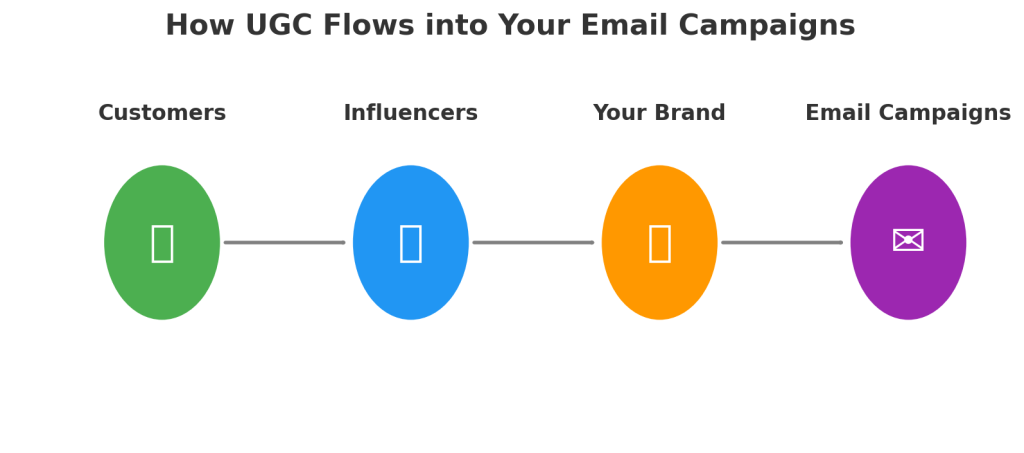
If you want, I can now create a visual infographic showing how UGC flows from customers to your email campaigns so it’s easier for brands to implement. That would make this article even more engaging. Would you like me to make it?
Email marketing isn’t just about hitting “send” and hoping for the best—it’s about continually refining your approach to get better results. The single most reliable way to do that is through A/B testing. What is A/B Testing and Why It Matters
A/B testing (also called split testing) is the process of sending two versions of an email to different segments of your audience to see which one performs better. The “winning” version is then used moving forward to optimise results.
It’s not guesswork—it’s data-driven marketing. And the reality is this: if you’re not testing, you’re assuming. And assumptions cost you money.
The fundamentals are simple:
Change one element at a time so you know what’s driving the difference.
Give each version a fair test under similar conditions.
Track results based on your primary goal—opens, clicks, or revenue.
Why always be testing? Because customer behaviour, inbox competition, and market conditions are constantly changing. Yesterday’s best practice can quickly become today’s worst-performing strategy. Testing ensures you’re always ahead of the curve. Purchase Order Rate: The Winning Metric
When running A/B tests, the ultimate goal isn’t to get the highest open rate or even the most clicks — it’s to drive sales. That’s why the purchase order rate should be your winning metric. Open rates are unreliable due to Apple’s MPP, and click rates only show interest, not revenue. Purchase order rate, on the other hand, measures the percentage of recipients who actually buy after receiving the email. It ties performance directly to revenue and ensures you’re optimizing for the metric that matters most: conversions. By focusing on purchase order rate, you avoid false positives and make decisions based on what truly grows the business, not just what gets attention in the inbox. Infographic titled “Email Marketing Optimisation: A/B Testing for Better Campaigns” compares strategies like send times (11 AM vs 2 PM), graphic vs text content, categories vs products, and subject lines. Emphasizes consistent testing for effective results. Orange and beige theme with envelope icons. The Importance of Proper Volume & Statistical Significance
One of the biggest mistakes you can make is testing on too small of a sample. You can’t send to 50 people and call the winner based on a 2% difference—it’s statistically meaningless.
For results to be conclusive, you need a statistically significant sample size. This means enough recipients that the result isn’t likely due to chance. The higher your email volume, the faster you can get valid results.
Don’t stop a test early because one version is “slightly” ahead. A true winner will show a clear, consistent lead that’s backed by meaningful data. How to Implement A/B Testing in Your Campaigns
The possibilities for A/B testing are endless. You can test anything—from subject lines to layouts to CTAs. But to get maximum impact fast, start with high-leverage tests that can dramatically shift performance.
Campaign Send Time
The content is exactly the same—the only difference is when you send it.
Why it matters: Different audiences engage at different times.
Pro Tip: It’s fine to send the same email at different times to test.
Once you find your ideal sending time, try to keep your send times consistent—customers will get used to seeing your brand in their inbox at a specific time.
The Offers You’re Putting in Your Campaigns
A/B testing your offers is one of the most powerful levers in email marketing because the offer itself is often the single biggest driver of conversions. The right offer can double or even triple your click-through and purchase rates, while the wrong one can leave revenue on the table.
By systematically testing discounts, free shipping, bonus gifts, loyalty perks, or early access incentives, you gain hard data on what truly motivates your audience. This takes the guesswork out of campaign strategy and ensures you’re not just sending more emails, but sending the right offers that maximize engagement, conversions, and long-term revenue. 🎯 Top Offers to Test in Email Campaigns
Percentage Discounts
    “Get 10% Off Your First Order” vs. “Take 20% Off Sitewide This Weekend.”
    Test the threshold — sometimes smaller, sustainable discounts convert as well as deeper ones.
Dollar Amount Discounts
    “Save $15 on Orders Over $75” vs. “$25 Off Your Next Purchase.”
    Dollar savings can feel more tangible than percentages for certain products.
Free Shipping Offers
    “Free Shipping on Orders Over $50” vs. “Free Shipping on Your First Order.”
    For many customers, shipping costs are the biggest barrier to purchase.
Bonus Gift With Purchase
    “Get a Free Travel-Size Lotion When You Spend $50” vs. “Free Tote Bag With Any Order.”
    Works especially well in beauty, apparel, or lifestyle niches.
Exclusive Early Access
    “Be the First to Shop Our New Collection” vs. “VIP Access to Limited-Edition Products.”
    Drives urgency and builds brand prestige.
Buy More, Save More
    “Buy 2, Get 1 Free” vs. “Save 25% When You Buy 3 or More.”
    Encourages higher average order values.
Loyalty or Points-Based Offers
    “Earn Double Points on Your Next Purchase” vs. “500 Bonus Points When You Shop Today.”
    Ideal for brands with loyalty programs.
Limited-Time Flash Sales
    “Today Only: 15% Off Everything” vs. “48-Hour Flash Sale: Save 20%.”
    Test urgency windows to see which drives the fastest action.
Contest or Giveaway Entry
    “Sign Up Today for a Chance to Win $100 Gift Card” vs. “Shop Now & Be Entered to Win.”
    Creates excitement and engagement beyond discounts.
Content-Driven Offers

“Download Our Free Style Guide” vs. “Get Exclusive Recipes With Your First Purchase.”
Great for brands that want to balance value with profitability.
📌 The key is to test different types of offers, not just different sizes of discounts, to discover what resonates most with your audience — value, exclusivity, urgency, or rewards.
Graphic-Based vs Text-Based Emails Graphic-heavy emails: Bold visuals, lifestyle shots, and product images work great for big drops, launches, and sales. Text-based emails: Often feel more personal—especially if sent “from the founder.” These can cut through the noise and create an authentic feel. Test idea: Send most campaigns in a visual style but use text-based designs for special, high-importance campaigns to make them stand out.
Also, test lifestyle images vs product-only images. Some audiences click more when they can see the product in use; others prefer clear product shots.
Categories vs Products
When running email campaigns, one powerful test is whether your subscribers respond better to category-level promotions (broad themes like “Shop Men’s Shoes”) or specific product promotions (narrow focus like “Shop the AirFlex Running Shoe”). How to Run the Test
Create Two Versions of Your Email:
    Version A (Category-Focused): Highlight a product category or collection. Example: “New Summer Dresses — Shop the Collection.”
    Version B (Product-Focused): Highlight a single product with details. Example: “The Perfect Summer Dress — Now in Stock.”
Keep Other Elements Consistent:
    Same subject line style, CTA design, send time, and audience segment.
    The only difference should be category vs. product focus.
Measure Results Based On:
    CTR (Click-Through Rate): Do people engage more with broad options or specific items?
    Conversion Rate: Do clicks from product emails result in more purchases than category emails?
    Revenue per Recipient (RPR): Which approach actually drives more revenue?
Why Test This?
Category Emails: Great for browsers and people in discovery mode. They provide options and appeal to wider interests.
Product Emails: Great for buyers further down the funnel, especially if the product solves a specific pain point.
Example Scenario
Category Test (A): “Shop Our New Coffee Collection → Espresso, Filter, Cold Brew.”
Product Test (B): “Try Our New Espresso Blend → Rich Flavor, Limited Edition.”
The results will tell you whether your audience prefers browsing multiple options or being directed to one hero product. You can bias your main campaigns toward the winner but still mix in the other style to keep variety.
Subject Lines & Preview Texts
The gateway to your email’s success is your subject line and preview text. Test:
Discount Mention vs No Discount Mention – “Save 20% Today” vs “Your New Favourite Arrived.”
With Emojis vs Without Emojis – Some audiences love them, some don’t.
All Caps vs Normal Case – “FLASH SALE” vs “Flash Sale.”
With Ellipses vs No Ellipses – “Something Special Just For You…” vs “Something Special Just For You.”
Important: Don’t just judge based on open rates. A subject line that gets more opens but fewer conversions is a losing subject line. Always look at revenue impact. 🗺️ A/B Testing Roadmap: Categories vs. Products
New Collection or Seasonal Launch Why Test? Subscribers are curious about what’s new but may not know what to buy yet. Recommended Test: Category Email (A): Showcase the full collection (e.g., “Explore Our New Summer Line”). Product Email (B): Spotlight one hero item (e.g., “The Summer Dress Everyone Will Want”). What to Watch: CTR & revenue. This test shows whether your audience prefers to browse or be guided to a specific “star” product.
Promotion or Sale Why Test? Some customers respond to broad savings, while others need a specific product to anchor the value. Recommended Test: Category Email (A): “Save 20% Across All Footwear.” Product Email (B): “20% Off Our Best-Selling Sneakers.” What to Watch: Conversion rate. This test reveals whether urgency around one product or broad savings drives more purchases.
Evergreen Campaigns (non-seasonal, ongoing emails) Why Test? Helps determine the most sustainable long-term strategy. Recommended Test: Category Email (A): “Discover Our Coffee Collection.” Product Email (B): “Try Our Signature Espresso Blend.” What to Watch: Revenue per recipient (RPR). This test highlights whether your audience is more responsive to general browsing prompts or specific product pushes.
Winback / Re-Engagement Campaigns Why Test? Inactive subscribers may re-engage with either variety or a strong product hook. Recommended Test: Category Email (A): “See What’s New in Store.” Product Email (B): “Our #1 Product Is Back in Stock.” What to Watch: Re-engagement (opens/clicks) + conversion. This test shows which message has more pulling power to reignite interest.
📌 General Rule:
Test categories when you want to drive browsing and exploration.
Test products when you want to create urgency and direct action.
Flowchart titled “What Type of Campaign Are You Running?” with three branches: “New Collection/Launch,” “Promotion/Sale,” and “Evergreen,” leading to testing strategies like CTR, Savings, Focus, Re-engagement.
Call-To-Action (CTA)
Testing the CTA allows you to determine which wording most effectively motivates your audience to take the desired action. Test:
Button Text
Test action verbs (“Shop Now” vs. “Get My Discount” vs. “Discover More” vs “Add To Cart“).
Compare benefit-driven CTAs (“Unlock Free Shipping”) vs. generic ones (“Click Here”).

Button Color & Style
    Bright, contrasting colors vs. subtle, brand-colored buttons.
    Rounded vs. sharp corners; solid vs. outlined buttons.
Placement in the Email
    CTA at the top vs. the middle vs. the bottom of the email.
    Single CTA repeated in multiple places vs. one at the end.
Number of CTAs
    One clear CTA vs. multiple CTAs (e.g., “Shop Men’s” and “Shop Women’s”).
    Testing whether one focused option outperforms choice.
CTA Length
    Short and punchy (“Shop Now”) vs. longer, benefit-driven (“Get 20% Off Today”).
Personalization
    Generic (“Shop Now”) vs. personalized (“Shop Your Favorites”, “See Picks for You”).
Tone & Style
    Formal (“Learn More”) vs. playful (“Let’s Do This 🎉”).
    Testing urgency (“Grab Yours Before Midnight”) vs. curiosity (“See What’s Waiting for You”).
CTA Format
    Button vs. hyperlinked text vs. image-based CTA.
    Testing whether subscribers respond better to bold visuals or subtle text links.
🚀 Top 5 CTA Tests to Run First
Personal CTAs show subscribers you’re speaking directly to them.
Action Text
Test verbs that drive urgency and benefit (“Save Now vs. “Shop Now”). Action-oriented CTAs almost always outperform generic ones.
Benefit vs. Generic
“Unlock Free Shipping” vs. “Click Here.” Benefit-driven CTAs typically deliver higher CTR because they answer “what’s in it for me?”
Button Placement
CTA at the top vs. at the bottom vs. repeated in both spots. Testing position often reveals surprising wins for mobile-heavy audiences.
Color & Contrast
High-contrast CTA buttons vs. subtle brand-colored ones. Clear, bold buttons tend to catch more clicks.
Personalization
Generic (“Shop Now”) vs. personalized (“Shop Your Favorites”, “See Picks Just for You”).
Images
Images are one of the most influential elements in an email, and A/B testing them can uncover what really captures attention and drives clicks.
Product vs. Lifestyle Images Test: A clean product shot on a white background vs. the product being used in real life. Why: Lifestyle imagery often drives emotional connection, while product shots highlight details.
Single Image vs. Collage/Grid Test: One large hero image vs. a collage of multiple products. Why: Some audiences prefer focus, others like variety.
Static vs. Animated (GIFs) Test: Static image vs. motion graphics or GIFs showcasing multiple products. Why: Motion often captures attention, but can also distract or slow loading times.
People vs. No People Test: Product image with a person using it vs. product-only. Why: Faces and human interaction often boost relatability and CTR.
Background & Color Schemes Test: Neutral, minimal backgrounds vs. bold, colorful ones. Why: Color psychology can affect mood, urgency, and purchase intent.
Image Size & Placement Test: Hero image at the top vs. smaller supporting images further down. Why: Placement influences scanning patterns, especially on mobile.
User-Generated Content (UGC) vs. Branded Imagery Test: A customer photo vs. a polished studio shot. Why: UGC often feels authentic and trustworthy, while branded visuals feel aspirational.
Seasonal/Contextual Imagery Test: Generic product shot vs. themed/seasonal context (e.g., holiday setting). Why: Seasonal context can boost relevance and urgency.
With Text Overlay vs. No Text Overlay Test: Adding copy like “20% Off Today” on the image vs. keeping it clean. Why: Text overlays reinforce CTAs, but sometimes reduce clarity if overdone.
📌 Best Practices When A/B Testing Images
Test one variable at a time (don’t change product, background, and text overlay in one test).
Optimize for mobile loading speed (compressed, fast-loading images win).
Track not just CTR, but also conversion rate to see if images lead to purchases.
Use heatmaps (Hotjar, Crazy Egg) to study where attention goes in your emails.
🚀 Top 5 High-Impact Image Tests
Product vs. Lifestyle Imagery
    Product shot on white background vs. product being used in real life.
    Often the single biggest test — lifestyle shots tend to boost emotional connection, but clean product images highlight details.
Static vs. Animated (GIFs)
    Single static image vs. animated GIF showing multiple products or features.
    GIFs can drive attention and higher CTR, but sometimes static images load faster and convert better.
User-Generated Content (UGC) vs. Branded Photography
    Polished studio photo vs. authentic customer photo.
    UGC often feels more relatable and trustworthy, especially in lifestyle niches like fashion, beauty, or fitness.
Single Hero Image vs. Product Grid
    One large hero image highlighting one product vs. a grid showing multiple options.
    Hero images focus attention, while grids appeal to variety-seekers.
With Text Overlay vs. Clean Image
    Image with promotional text overlay (“20% Off Today”) vs. plain image without text.
    Overlays reinforce the offer visually, but sometimes a clean image feels more premium.
📌 Pro Tip: Start with these five tests before diving into background colors, seasonal themes, or placement. They consistently reveal what your audience prefers and can quickly improve CTR and conversions. 📖 Mini Case Study: Lifestyle vs. Product Image Test
A mid-sized DTC skincare brand wanted to understand whether their audience responded better to clean product shots or lifestyle imagery in their email campaigns.
Version A (Product Image): A polished studio shot of their new serum bottle on a white background.
Version B (Lifestyle Image): A model applying the serum in a natural bathroom setting.
Results after sending to a 50/50 split of 20,000 subscribers:
Version A CTR: 2.8%
Version B CTR: 4.6% (a 64% increase)
Revenue per recipient (RPR): $1.92 vs. $3.45
Takeaway: Lifestyle imagery outperformed clean product shots because it helped subscribers visualize themselves using the product, making the experience more relatable and emotionally engaging. The Endless Testing Mindset
The best-performing brands aren’t lucky—they’re obsessed with testing. They’re constantly asking:
What happens if we change this?
Does this design work better?
Are we sending at the right time?
Over time, small incremental improvements compound into massive results. Key Takeaways
Always test one thing at a time.
Start with high-impact variables like send time, email style, and subject lines.
Ensure you have a large enough sample for statistical significance.
Judge success based on the right metric (clicks, conversions, revenue).
Keep testing—because what works today might not work tomorrow.
Segmentation is the backbone of high-performing email marketing. It simply means dividing your subscribers into groups based on the interests, characteristics or behaviors you can track—such as how they interact with your emails or website—and then sending each group tailored offers and communications that match their interests.
When you first start with email marketing, every subscriber usually gets tossed into one big bucket. Everyone receives the same message—and in the beginning, that’s fine. But as your list grows, you’ll start to notice something important: not all subscribers are the same. Some are brand-new and just getting to know you, while others are further down the funnel and closer to buying. Some want quick tips and advice, while others are more interested in learning your brand story.
That’s where segmentation comes in.
Instead of blasting every email to your entire list, segmentation allows you to send tailored, relevant messages to specific individuals based on shared characteristics, activity or behaviors. Segments help your emails become more targeted, personalized, and relevant. By tailoring your offers to match each group’s specific needs and interests, you send smarter emails and significantly increase the chances of engagement, conversions, and ultimately, more sales.
Create customer persona segments to group your customers by various characteristics, such as:
Their interests
How much they spend
How frequently they purchase
Then, send personalized content based on these personas. For example, if you sell pet products, you may send a cat food product launch campaign to a segment of cat owners.
The Benefits of Segmentation in Email Marketing
Segmentation is one of the most powerful strategies in email marketing. It allows you to talk to the right people at the right time. In fact, according to Klaviyo’s yearly benchmark report, highly segmented emails result in:
Lower unsubscribe rates (unsegmented campaigns lead to 2x the amount of unsubscribes in comparison).
2x the average open and click rates compared to emails sent to unsegmented lists.
3x the revenue per recipient ($0.19 vs. $0.06).
Segmentation goes far beyond just improving campaign performance. It forces you to think strategically about your customers, which creates a foundation for many of your broader business and marketing processes.
By breaking your audience into subsets, you’re not just organizing your email list—you’re gathering valuable business intelligence. You’ll see which groups drive the most revenue, which ones engage the most with your campaigns, and where to focus your marketing resources for maximum impact.
Here are the key benefits of segmentation:
1. Increased Engagement
When you send messages that align with a customer’s interests or behavior, they’re far more likely to open, click, and respond. Segmentation ensures your campaigns are highly relevant, which naturally drives higher engagement rates compared to generic, one-size-fits-all emails.
2. Higher Sales and Revenue
Relevance drives conversions. By tailoring your offers to specific groups—such as past purchasers, repeat buyers, or customers who browsed a particular category—you’re sending promotions they’re more likely to act on. This targeted approach directly translates into higher sales.
3. Improved Customer Lifetime Value
Segmentation helps you nurture customers at every stage of their journey. From personalized upsell campaigns to win-back flows for inactive customers, segmentation allows you to keep customers engaged longer. The result: a measurable increase in lifetime customer value (LTV).
4. Lower Unsubscribe Rates
When subscribers consistently receive emails that matter to them, they’re far less likely to hit “unsubscribe.” Segmentation minimizes list fatigue, extends the lifespan of your subscriber base, and saves you money by keeping your audience engaged rather than forcing you to constantly chase new leads.
5. Smarter Resource Allocation
By analyzing segmented data, you can see which groups of customers are most valuable. This intelligence allows you to prioritize your marketing budget and energy where it will deliver the highest return, instead of spreading your efforts too thin.
6. Automation Potential
One of the most powerful aspects of segmentation is how well it pairs with automation. Modern platforms like Klaviyo let you design automated flows that target specific users based on characteristics (such as age, location, or gender) or event triggers (such as browsing certain products, purchasing a specific item, or reaching a VIP spend threshold). These automated, behavior-driven campaigns run in the background, saving you time while continually delivering relevant, high-performing emails.
Essential Email Segments
Effective segmentation is the foundation of modern email marketing. By grouping customers based on their behaviors, preferences, and lifecycle stage, brands can send messages that feel personal, timely, and relevant — the key ingredients for driving engagement, loyalty, and sales.
Below are the 13 most impactful customer segments every brand should prioritize, along with clear goals and actionable steps for each.
1. New Subscribers (Welcome Flow)
Goal: Encourage prospects to make their first purchase.
The welcome series is your chance to make a lasting first impression. New subscribers are most engaged right after signing up, so capitalize on that moment.
Best practices:
Automate a welcome series: Send 3–8 emails spaced out over the first 1–2 weeks. Gradually build a connection by sharing your brand story, value proposition, and bestsellers.
Act fast: Deliver the first message immediately after signup.
Offer an incentive: A welcome discount is often the nudge first-time buyers need.
Gather preferences: Include options to personalize future communications — e.g., “Tell us what you’re most interested in.”
Done right, your welcome series sets the tone for the relationship and primes subscribers for their first purchase.
Cart abandonment is one of the biggest lost revenue opportunities in e-commerce — but also one of the easiest to fix.
Best practices:
Segment checkout abandoners: Identify users who added products to their cart but didn’t complete checkout.
Use dynamic content: Display images of the exact items left behind.
Send reminders quickly: The first reminder should go out within 24 hours.
Add urgency or incentives: For high-value carts, consider offering limited-time discounts.
Make it seamless: Use clear CTAs like “Return to Your Cart” to reduce friction.
3. Recent Buyers (Post-Purchase Flow)
Goal: Increase customer lifetime value through upsells and cross-sells.
The sale isn’t the end of the journey — it’s the beginning of loyalty. Post-purchase flows are critical for nurturing customers beyond their first order.
Best practices:
Segment by purchase history: Recommend products that complement their recent purchase.
Avoid generic bestsellers: Recommendations should feel thoughtful and relevant.
Educate and empower: Create content series that help them get the most out of what they bought.
Position recommendations as helpful, not pushy: “Complete your collection” or “Get more from your purchase” works better than hard selling.
This flow not only drives repeat purchases but also builds trust by showing customers you’re invested in their success with your products.
4. Inactive Customers (Win-Back Flow)
Goal: Reignite interest among customers who haven’t purchased in 60–120 days.
Customer churn happens, but with smart win-back campaigns, you can re-spark connections.
Best practices:
Leverage purchase history: Recommend products that naturally follow from past buys.
Show what’s new: Highlight updates since their last engagement.
Personalize, don’t generalize: Avoid random promotions; make suggestions feel curated.
Time it right: For consumables, use average usage timelines to time replenishment emails.
A personalized reminder can turn “forgotten” customers into loyal repeat buyers.
5. Browsing Abandoners (Browse Abandonment Flow)
Goal: Re-engage customers based on browsing behavior.
Not every shopper who shows intent adds items to their cart. Browse abandonment flows let you capitalize on interest before it fades.
Best practices:
Track browsing behavior: Identify products or categories customers explored.
Segment by product viewed: Send emails showcasing those specific items.
Address barriers: Answer objections like shipping costs or product details.
Add urgency: Use messaging like “Only a few left” to nudge conversions.
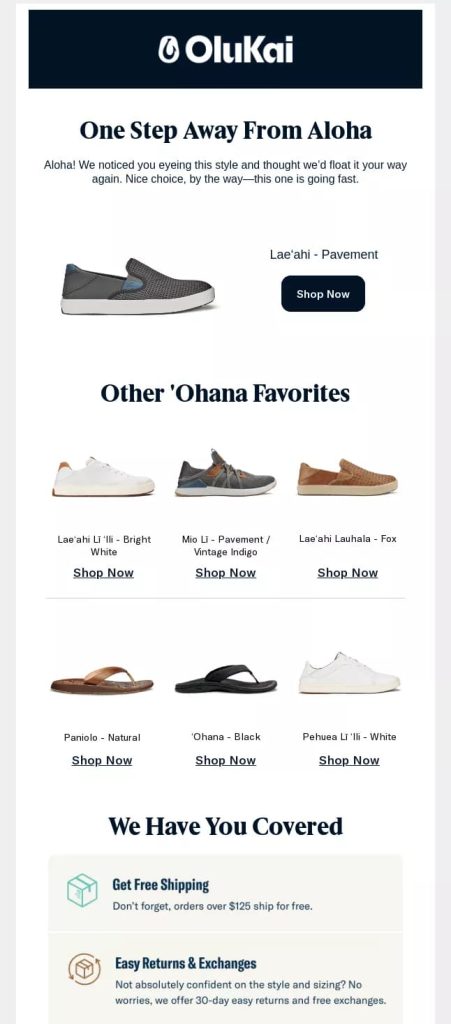
OluKai’s personalized product reminder email leverages browsing behavior to re-engage shoppers and encourage them to return to the store. The headline — “One Step Away From Aloha” — delivers a light, friendly nudge to users who viewed a product but didn’t add it to their cart or complete a purchase.
The featured shoe takes center stage, paired with a message that conveys subtle urgency (“This one is going fast”). Below, a curated row of related styles, labeled “Other ‘Ohana Favorites,” provides appealing alternatives to increase engagement and conversion. Reassurances such as free shipping and easy returns help overcome hesitation and make purchase decisions easier.
This email is a textbook example of behavior-based segmentation, keeping products top-of-mind while offering both alternatives and support to maximize the likelihood of conversion.
6. Inactive Subscribers (Sunset Flow)
Goal: Win back dormant subscribers while maintaining deliverability.
Not all subscribers stay engaged forever, but you can reawaken many before suppressing them.
Best practices:
Define inactivity: Typically no purchase or engagement in 90–180 days.
Vary approaches: Test casual check-ins, special offers, or curiosity-driven subject lines.
Know when to let go: Suppress persistently unresponsive subscribers to protect email deliverability.
Personalize by history: Tailor re-engagement emails based on past interactions.
7. VIP Customers (VIP Flow)
Goal: Maximize revenue from your most valuable customers and strengthen relationships by providing exclusive access to premium products or limited editions.
High-value customers aren’t motivated by discounts — they respond to exclusivity, quality, and unique experiences. Focus on what makes your offering special: limited availability, superior craftsmanship, premium features, or elevated service. By emphasizing value over price, you create a sense of privilege that resonates with your most loyal and valuable shoppers.
Best practices:
Identify top customers: Use spending, frequency, and engagement data.
Acknowledge their status: Call it out explicitly in subject lines and content.
Offer exclusive perks: Early access, special events, limited editions, or premium service.
Focus on appreciation: Make them feel celebrated, not exploited.
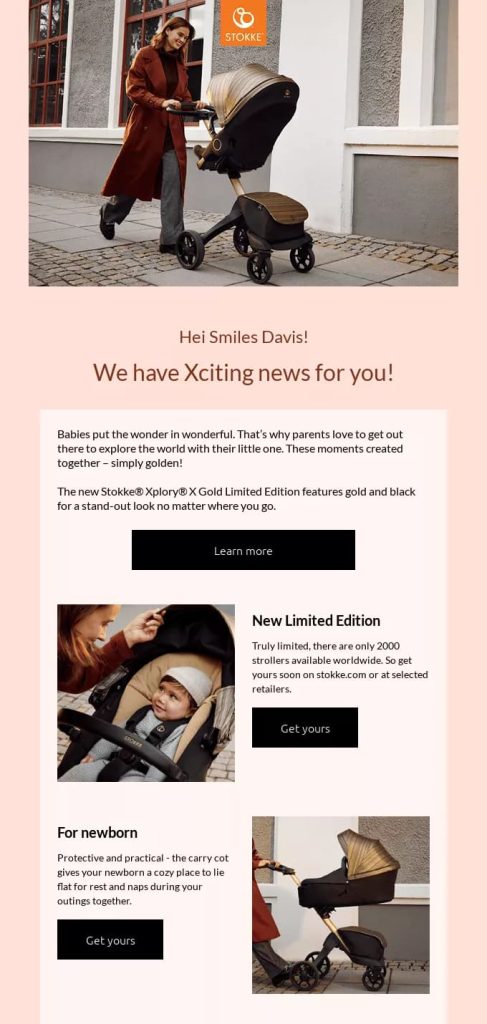
Example: Stokke’s premium product email is designed to engage high-value, VIP customers by featuring the exclusive Limited Edition Xplory® X Gold stroller. This campaign strategically targets top-tier shoppers who are most likely to appreciate and invest in luxury offerings.
The headline — “We have Xciting news for you!” — sparks curiosity, while personalized touches like the recipient’s name enhance the VIP experience. With only 2,000 units available worldwide, the stroller’s exclusivity is emphasized, positioning it as a luxury must-have.
Elegant visuals, gold accents, and lifestyle imagery reinforce the product’s premium status, while clear CTAs — “Learn more” and “Get yours” — make it effortless for engaged customers to act, appealing to their desire for quality, status, and exclusivity.
8. Special Events (Birthday Flow)
Goal: Build emotional connections through celebration.
Few things feel more personal than a birthday message — especially one that comes with a thoughtful perk.
Best practices:
Collect dates upfront: Gather birthdays during signup or in preference centers.
Send at the right time: A few days before the birthday ensures they can use any special offer.
Keep it personal: Focus on well-wishes first, promotions second.
Offer a gift: A birthday-exclusive discount or freebie creates delight.
Measure impact: Track redemption rates to refine your approach.
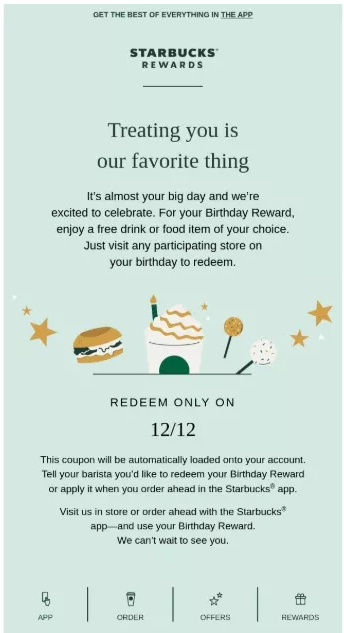
This birthday email from Starbucks delivers a warm, celebratory experience for the customer. The friendly headline — “Treating you is our favorite thing” — immediately conveys a sense of personal attention, while offering a free drink or food item to redeem on the recipient’s special day.
The design is clean and visually appealing, featuring illustrations of treats that reinforce the celebratory mood without overwhelming the message. The customer’s birthday is prominently highlighted, creating a timely and personal call-to-action that encourages immediate engagement.
9. Seasonal & Holiday (Holiday Flow)
Goal: Align promotions with seasons, weather, and regional holidays.
Seasonality is a powerful driver of purchases, but success depends on smart timing and localization.
Best practices:
Segment by location: Different regions have different holidays and climates.
Use historical data: Learn from previous seasonal buying trends.
Plan ahead: Start early enough to catch planners, but maintain urgency with limited-time offers.
Localize messaging: Adapt language, currency, and cultural references for maximum relevance.
10. Location-Based Promotions
Goal: Deliver hyper-relevant campaigns tied to geography.
Local context makes messages feel more personal and actionable.
Best practices:
Leverage location data: Gather from signup, purchase, or browsing.
Highlight local relevance: Promote nearby store events, shipping deadlines, or local trends.
Customize content: Reflect regional nuances in messaging and product suggestions.
Think macro and micro: Tailor both by country/region and local community events.
11. Engaged Customers
Goal: Generate excitement and loyalty by offering pre-sale access.
Highly engaged customers are prime advocates — reward them with exclusivity.
Best practices:
Identify engaged audiences: Frequent openers, clickers, or repeat buyers.
Create exclusive previews: Send private links or first access to new products.
Use personal language: “Reserved for our best customers” builds emotional connection.
Add urgency: Limited-time or quantity-limited access makes it irresistible.
Request feedback: Gather insights from your best customers before rolling out widely.
12. One-Time Buyers (Reactivation Flow)
Goal: Convert first-time buyers into repeat customers.
Many customers buy once and never return — but a well-timed reactivation can change that.
Best practices:
Segment one-time buyers: Focus on those who haven’t returned within your average repeat purchase window.
Personalize by purchase: Reference their original order to keep it relevant.
Incentivize return: Offer a discount or free shipping tailored to order value and timing.
Recommend complements: Suggest items that enhance their first purchase.
Turning one-time buyers into repeat customers is one of the highest-ROI opportunities in email marketing.
13. Window Shoppers (Site Abandonment Flow)
Goal: To engage visitors who signed up to your email list and browsed your website but left without adding anything to their cart.
This flow is essential for ecommerce businesses because it helps recover potential customers who might otherwise disappear for good.
Best practices:
Segment Your Audience: Don’t treat all site abandoners the same. Segment by behavior: product viewed, category interest, price range, or previous purchase history. Personalization increases relevance and engagement, making it more likely the visitor returns.
Time Your Emails Strategically: Send the first email within a few hours of the visit while the experience is still fresh. Follow up with 1–2 additional emails spaced over a few days, increasing urgency or offering incentives if appropriate.
Personalize and Highlight the Product. Include dynamic product recommendations based on the item(s) they viewed. Use persuasive copy and visuals that remind them why they clicked in the first place.
Test and Optimize Continuously. Use A/B testing on subject lines, send times, copy, and creative. Track metrics like open rates, click-through rates, and conversions. Iterate based on performance to maximize ROI and ensure the flow remains effective over time.
Final Thoughts
Segmentation isn’t about sending more emails — it’s about sending the right emails to the right people at the right time. By building these core segments into your marketing strategy, you create experiences that feel personalized, relevant, and valuable.
The result? Stronger customer relationships, higher lifetime value, and sustainable growth.
When it comes to email marketing, visuals are powerful. They grab attention, showcase products beautifully, and can drive conversions. But there’s a catch — send an email that’s only made up of images, and it will almost certainly get flagged as spam. Email providers like Gmail see image-only emails as suspicious because spammers often hide text in pictures to bypass filters.
The good news? You can send image-rich emails — as long as you maintain a healthy balance between text (HTML) and images.
Why HTML Balance Matters
HTML in emails is essentially native text that the email client can read. A balanced ratio of HTML to images tells spam filters that your email is legitimate. The challenge, however, is that HTML in emails can be frustrating from a design perspective:
Design Limitations: You can’t place HTML text directly over an image, so you have to separate text and visuals in your layout.
Unpredictable Rendering: Text sizes can vary dramatically across devices, causing layout issues.
Dark vs. Light Mode Problems: HTML text may shift colors depending on the reader’s settings, ruining design consistency.
Because of these issues, many email designers avoid mixing HTML into the main body of an image-heavy email — it can compromise design quality and lead to an inconsistent experience for recipients.
Mixing Graphic & Text-Based Emails
A strong campaign strategy blends visual appeal with personal touch.
Graphic emails: Showcase products, build brand recognition, and provide visual variety. Essential for engagement and keeping subscribers excited.
Text-based emails: Look like a message from a friend, feel personal, and often convert better because they’re simple and to the point.
Most of your emails should be graphic-based, but mixing in 1–2 text-based emails per month gives that “human touch” that drives conversions.
The Secret: Avoid Predictability
Today’s consumer doesn’t want to receive the same thing over and over again. If your emails feel formulaic, subscribers will lose interest. Surprise, variety, and freshness are what keep people opening and clicking.
Think of your emails like a conversation—sometimes fun, sometimes informative, sometimes persuasive—but always engaging.
The Smart Workaround: Hidden HTML in the Footer
Since you can’t send pure image emails, you need HTML — but you don’t want it interfering with your design. The solution? Hide the HTML content in a way that’s invisible to your readers but visible to email spam filters.
Here’s how to do it:
Add a Large HTML Text Block to the Footer
Insert a text box in your email footer, far away from the main design.
Write 400–500 Words of Text
This can be brand stories, disclaimers, or even blog-like content — anything relevant to your brand.
Shrink the Text Size
Set it to the smallest possible readable size in your email editor.
Match Text Color to Background
If your footer background is white, make the text white. If it’s black, make the text black. This makes it invisible to human eyes but readable by spam filters.
By doing this, you achieve two important things:
Gmail sees a balanced mix of HTML and images, improving deliverability.
Your design remains untouched and consistent across devices.
The Result
This technique ensures you can send visually stunning, image-rich emails without sacrificing inbox placement. It keeps the HTML “out of the way” of your design while satisfying the technical requirements that prevent emails from being flagged as spam.
It’s a small trick, but it can make a huge difference in how Gmail and other email providers perceive your messages — and in how many of them land in the inbox rather than the spam folder.